Aman-Mittal opened a new issue, #492:
URL: https://github.com/apache/fineract-backoffice-ui/issues/492
## What happens
`/profile` displays Username, Display Name, Office, Email and Roles as
static text. It has **zero** interactive elements:
```js
document.querySelector('main').querySelectorAll('button, a, ion-button,
input, ion-input, select, [role="button"]')
// → length: 0
```
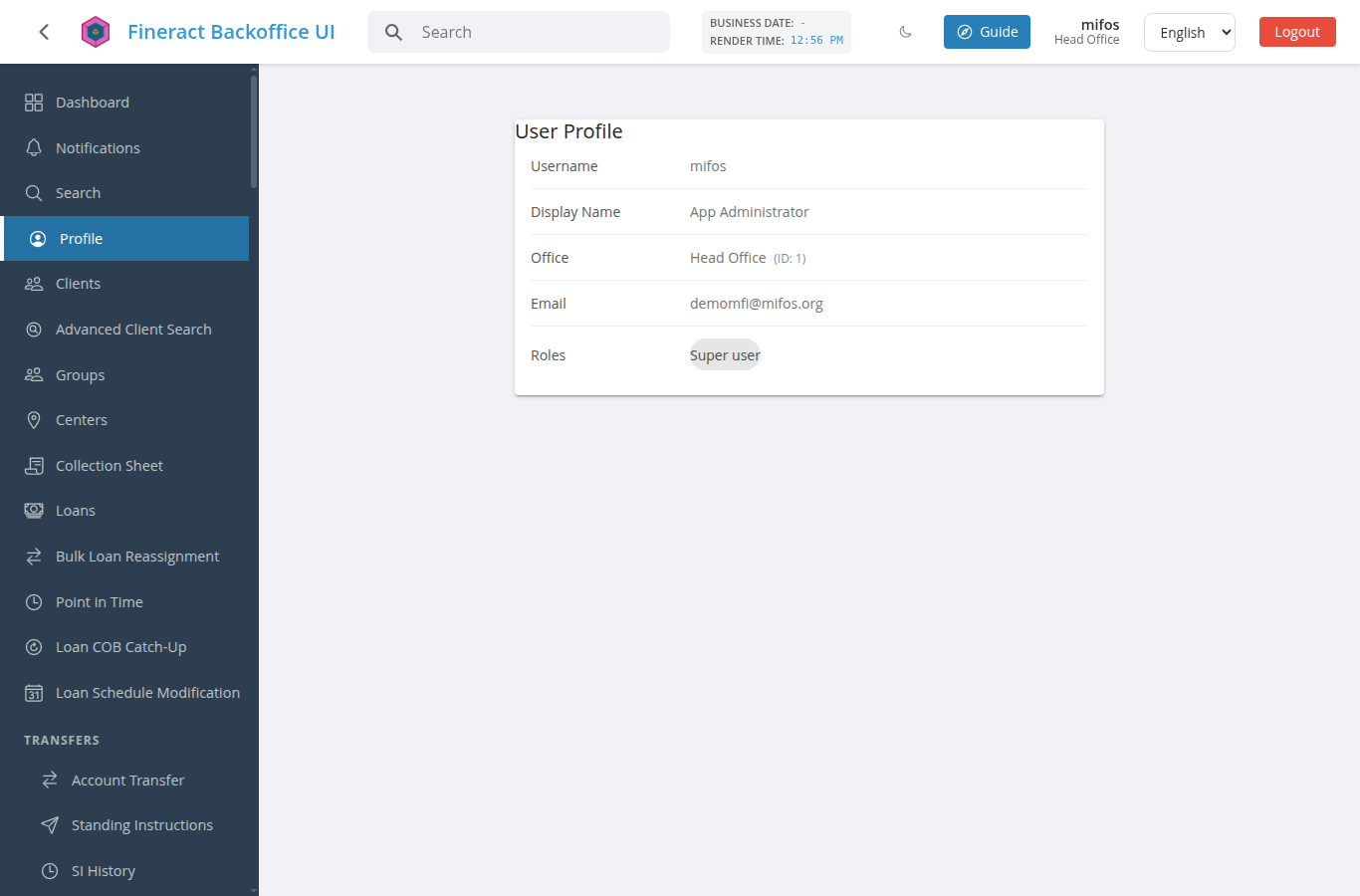
Confirmed in source — `src/app/features/profile/user-profile.component.ts`
is a template of `.detail-row` spans and `ion-chip`s with no controls of any
kind.
## The gap is app-wide, not just this screen
There is no change-password capability anywhere in the application:
```console
$ grep -rln "changePassword\|change-password\|CHANGE_PASSWORD" src/app
--include=*.ts
src/app/api/model/commandWrapper.ts # generated API model only
```
The only hit is in generated API bindings. No component, no route, no
service call. `app.routes.ts:242` registers `profile` → `UserProfileComponent`
and nothing else.
So a logged-in user has no way to rotate their own password, correct their
email, or update any profile field. The only path is an administrator editing
them through Users administration.
## Why this matters for a production deployment
Password rotation is baseline security hygiene, and in many deployments it
is a compliance requirement rather than a preference. Routing every password
change through an administrator also means the administrator necessarily learns
or sets the user's new credential, which is worse than the user setting it
themselves.
The backend already supports it — `PUT /users/{id}` accepts `password` /
`repeatPassword`, and Fineract exposes password-preference rules the UI could
validate against (`/system/password-preferences` is already a screen in this
app).
## Suggested scope
1. A **Change Password** action on `/profile` opening a form with current
password, new password and confirmation, validated against the tenant's
configured password preferences.
2. An **Edit** action for the self-serviceable fields (email at minimum),
leaving office and roles administrator-only.
Step 1 is the one that closes the security gap and is worth doing on its own.
## Environment
Verified against a clean checkout of `main` (`a24a06ba`) served with `ng
serve`, backend `sandbox.mifos.community`, logged in as `mifos`, 1366×900,
Chrome.
--
This is an automated message from the Apache Git Service.
To respond to the message, please log on to GitHub and use the
URL above to go to the specific comment.
To unsubscribe, e-mail: [email protected]
For queries about this service, please contact Infrastructure at:
[email protected]

