I second this. I learned to use the mouse with my other hand in about week
too. I know swap the hand from time to time.
I've also used an MS Natural type keyboard for about 10 years (give or take
- though I've just switched off it for a couple of months rest to get used
to a normal one for a while). I'm not a full touch typist but these
keyboards enabled me to type way faster (so may have led to the problem
ironically)

After I switched to using the mouse with both hands, work bought me an
 Evoluent Vertical Mouse 2 (left handed version), as an aid to the pain I
was getting in my right wrist. I now have both mice plugged in. And swap as
I see fit. The only problem with the left handed mouse is that's wired
upside down. This means I cannot use my preferred technique of right handed
buttons on the left hand. I have to swap the mouse buttons in Windows to do
this.

I also saw a physio for a few weeks who helped  retrain my muscles to work
more ergonomically.

This is completely anecdotal but correcting the bad posture and movements +
resting the hand periodically has completely removed any pain.

I do remember this quote that prompted me in to action "This could be a
career killing condition".

I urge anyone to to get professional help for something that
could ultimately stop them from working and lets face it, keyboards and mice
are in our foreseeable future.

-- preet

On 7 July 2011 08:33, noonie <[email protected]> wrote:

> Totally unsubstantiated opinion...
>
> "Faster" keyboard = more clicks per minute > more chance of repetitive
> strain.
>
> Years ago I learned to mouse with my off hand. Took about a week. Just
> think "left button"/"right button" instead of "index finger"/"middle finger"
> and you're golden.
>
> Changing hands made the pain go away.
>  On Jul 6, 2011 9:53 PM, "Les Hughes" <[email protected]> wrote:
> >
> > Hey All,
> >
> > This is kind of long (eeep), but here goes:
> >
> > Lately I've have been getting a little tense in my mid-right back area
> > and right wrist which I believe is been caused by a lot of the mouse
> > work I've been doing over the past few weeks in which my right arm is
> > constantly extended out around 30-40 centimetres from the home position
> > on the keyboard.
> >
> > I thought here would be a good place to ask for advice in how everyone
> > else, whom, like me, spends upwards of 60 hours per week behind their
> > battlestations. (check: http://www.reddit.com/r/battlestations for info
> > on 'battlestations')
> >
> > The main areas I am currently looking at are Keyboards, Mice, and
> > Keyboard Layouts.
> >
> >
> > Keyboards
> > -------------------------------------------------------------------------
> > I currently use a Microsoft Ergonomic 4000 Keyboard (
> >
> http://www.microsoft.com/australia/hardware/mouseandkeyboard/images/products/nek4k/mk_productdetails_nek4k.jpg
> > ) and am starting to think that the space between the right control key
> > (below the right shift and enter keys) where the arrow buttons and
> > numeric pad are just get in the way.
> >
> > So far I am thinking about moving to a smaller keyboard to limit the
> > space I need to move for the mouse, ideas so far are the
> >
> > - Truly Ergonomic keyboard @
> > http://www.trulyergonomic.com/images/Truly_Ergonomic_Keyboard.jpg &
> > http://www.trulyergonomic.com )
> >
> > - Kinesis Freestlye VIP @
> > http://www.kinesis-ergo.com/images/freestyle-vip_648x339.jpg -
> > http://www.kinesis-ergo.com
> >
> >
> > Mouses - mice, mices :P
> > -------------------------------------------------------------------------
> > I am leaning towards a trackball, but have also considered something
> > more vertical:
> >
> > - Kensington Expert Trackball @
> >
> http://www.smartmadesimple.com.au/Products/images/Zoom/z64325%20Expert%20Mouse.jpg
> > (favourite so far)
> >
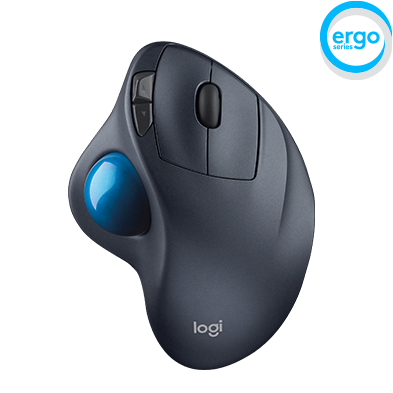
> > - Logitec M570 @
> >
> http://www.logitech.com/assets/32954/4/logitech-wireless-trackball-m570.png
> >
> > - EZ Vertical Mouse @
> http://www.auzspec.com.au/media/274270427lMSEZ1L.jpg
> >
> >
> > Keyboard Layouts
> > -------------------------------------------------------------------------
> > Perhaps a religious battle, but:
> >
> > I was thinking if I am going to go along the whole self improvement
> > route with better devices, why not visit my keyboard layouts? Most of us
> > use QWERTY: http://en.wikipedia.org/wiki/QWERTY
> >
> > Much of my reading seems to point towards qwerty being a terrible
> > layout, and something that should have died with the typewriter (it's
> > keylayout is meant to slow you down, and has more to do with stopping
> > those thingies on the typewriter from getting stuck together... those
> > who have used typewriters will know what I mean)
> >
> > Besides QWERTY, there are a few others that seem to be gaining traction,
> > they are:
> >
> > DVORAK: http://en.wikipedia.org/wiki/Keyboard_layout#Dvorak
> >
> > Colemak: http://en.wikipedia.org/wiki/Keyboard_layout#Colemak
> >
> > Colemak so far looks the most appealing to me if I were to change,
> > http://colemak.com/ has a good explanation of the keyboard, but seems to
>
> > be down right now :/
> >
> >
> > The questions:
> > -------------------------------------------------------------------------
> >
> > - Has anyone gone down the ergonomic path, and what did end up doing?
> >
> > - Are there any recommended keyboard/mouse combinations that you think
> > are worthwhile?
> >
> > - Does anyone think a smaller kayboard is better development with a
> > numeric pad on the left or a USB external one?
> >
> > - Trackballs: yay or nay?
> >
> > - Has anyone changed their keyboard layout, and if so, would you
> > recommend it?
> >
> > -------------------------------------------------
> >
> > Hopefully this isn't too early for the week (not friday), but I'd be
> > really interested in any feedback anyone has.
> >
> > Thanks heaps :)
> > --
> > Les Hughes
> > [email protected]
>