Just added an example last nite on SkinExtrude
(try to fill the example section and the doc on a regular base now...
but its still not up, will be in few hours)
so here another example of it
var mat:BitmapMaterial = new BitmapMaterial(somecoolimage);
var aPts1:Array = [new Number3D(-150, 200, 0), new Number3D(-100,
0, 0), new Number3D(100, 0, 0), new Number3D(150, 200, 0)];
var aPts2:Array = [new Number3D(-150, 200, -100), new
Number3D(-100, 0, -100), new Number3D(100, 0, -100), new Number3D(150,
200, -100)];
var skinextrude:SkinExtrude = new SkinExtrude( [ aPts1, aPts2 ] ,
{material:mat, flip:true, subdivision:2, scaling:1, coverall:true,
recenter:true, closepath:false});
view.scene.addChild(skinextrude);
the class is just generating a connection between 2 series of points
in space.
a simple example to make Plane would be in speudo code

var apt1 array of the points left = [ topleft, bottomleft]
var apt2 array of the points left = [ topright, bottomright]
new SkinExtrude( [  apt1, apt2  ]
now they are linked, you can now increase the subdivision, it will add
it between for instance left and right. If you want
to increase between top and bottom, just add more points.
This class allows you to build surfaces the easy way even if they are
quite complicated. look at elevationClass for instance
it just generate the arrays, then pass it to this class.

that was for the SkinExtrude...

The SegmentExtrude class is a totally different concept.
It not having or using any profile information, it generates flat or
extrudes along a straight linesegment.
it also insure you do not get overlappings at any angles. Its highly
suitable to simulate walls, fences, etc, you can add thickness
and it supports multiple textures.

here more details
http://away3d.com/away3d-extrudes-1

Fabrice


On Nov 14, 2008, at 8:39 AM, Rialy wrote:
Thanks Fabrice very much.

But How to use SkinExtrudes?
and i found that there is a class called SegmentsExtrude,what's
the difference between two classes?


On 11月13日, 下午6时58分, Fabrice <[EMAIL PROTECTED]> wrote:
When the new classes I'm on will be done, I'll try find time to make
this primitive.
Because the way the geometry is described in this thread will be
missing one major thing: the propper uv's.

Fabrice

On Nov 13, 2008, at 10:45 AM, Makc wrote:
what can I say, noone knows this stuff better than Fabrice
2008/11/13 Fabrice <[EMAIL PROTECTED]>:
No, this shape would have holes...
I would do it this way:
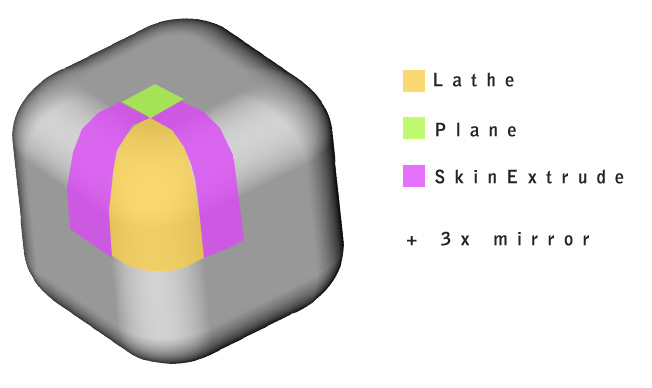
1 Lathe for the whole corner
2x  SkinExtrudes reusing same points to define half/side, both
right and
left, but defining half/width/depth.
1 1/4 plane. // note that it's not even necessary if you provide
one skin
extrude two points that would cover the plane area..
that's a 1/8 of the cube
now use Mirror class 3x time, on x, y and then z.
http://www.closier.nl/playground/roundedcube.jpg
Fabrice
On Nov 13, 2008, at 8:56 AM, Makc wrote:
here is how you could do it by code. warning: I've got mad drawing
skillz
:)
2008/11/13 Rialy <[EMAIL PROTECTED]>:
Anyone can give me a more detail explanation or give me a
example?
Thanks a lot.
On 11月12日, 下午11时38分, "Peter
Kapelyan" <[EMAIL PROTECTED]> wrote:
Ah that's a bummer to make...I would suggest doing it in a 3D
modeller.
Otherwise there it could possibly be done with 6 shapes using
one of
Fabrice's Extrude classes, put together. My brain isn't working
well
today, so I'm not sure if it's even possible.
I am sure there is a button to make that shape in most decent 3D
packages..I
have made that shape a few times myself in Lightwave.
The smoother you want those curves to be the more poly's you
will need.
-Pete
On Wed, Nov 12, 2008 at 10:18 AM, Rialy <[EMAIL PROTECTED]>
wrote:
the new primitive is like the one of following link.
http://sketchup.google.com/3dwarehouse/details?mid=d6972d5d815075b2f3
...
The different is that my model is not a hole in the middle.
On 11月12日, 下午8时42分, "Rob
Bateman" <[EMAIL PROTECTED]> wrote:
Hey Rialy
you'll have to give a bit more explanation of the shape you're
after,
i'm
not sure i get it! Maybe a quick drawing?
Rob
On Wed, Nov 12, 2008 at 2:06 AM, Rialy
<[EMAIL PROTECTED]> wrote:
Hi all
Now there is a puzzle that has comfuse me a lot time.
I want to create a new model using the away3d existed
primitve.
The requirement as following:
1. it looks like a cube,but on its eight vertex it has a
radian.
2. how to using exist image to implement texture.
Appreciate for any advice.
Raily
--
Rob Bateman
Flash Development & Consultancy
[EMAIL PROTECTED]
--
___________________
Actionscript 3.0 Flash 3D Graphics Engine
HTTP://AWAY3D.COM- 隐藏被引用文字 -
- 显示引用的文字 -
<round_cube.GIF>- 隐藏被引用文字 -
- 显示引用的文字 -