So appreciate for fabrice's help.Now i have understood how to use
skinExtrude.
But i feel great shame that i still don't understand the way Fabrice's
said.


On 11月14日, 下午4时27分, Fabrice <[EMAIL PROTECTED]> wrote:
> Just added an example last nite on SkinExtrude
> (try to fill the example section and the doc on a regular base now...
> but its still not up, will be in few hours)
>
> so here another example of it
> var mat:BitmapMaterial = new BitmapMaterial(somecoolimage);
>                         var aPts1:Array = [new Number3D(-150, 200, 0), new
> Number3D(-100,
> 0, 0), new Number3D(100, 0, 0), new Number3D(150, 200, 0)];
>                         var aPts2:Array = [new Number3D(-150, 200, -100), new
>
> Number3D(-100, 0, -100), new Number3D(100, 0, -100), new Number3D(150,
> 200, -100)];
>                         var skinextrude:SkinExtrude = new SkinExtrude( [
> aPts1, aPts2  ]  ,
> {material:mat, flip:true, subdivision:2, scaling:1, coverall:true,
> recenter:true, closepath:false});
>                         view.scene.addChild(skinextrude);
>
> the class is just generating a connection between 2 series of points
> in space.
> a simple example to make Plane would be in speudo code
>
> var apt1 array of the points left = [ topleft, bottomleft]
> var apt2 array of the points left = [ topright, bottomright]
> new SkinExtrude( [  apt1, apt2  ]
> now they are linked, you can now increase the subdivision, it will add
> it between for instance left and right. If you want
> to increase between top and bottom, just add more points.
> This class allows you to build surfaces the easy way even if they are
> quite complicated. look at elevationClass for instance
> it just generate the arrays, then pass it to this class.
>
> that was for the SkinExtrude...
>
> The SegmentExtrude class is a totally different concept.
> It not having or using any profile information, it generates flat or
> extrudes along a straight linesegment.
> it also insure you do not get overlappings at any angles. Its highly
> suitable to simulate walls, fences, etc, you can add thickness
> and it supports multiple textures.
>
> here more detailshttp://away3d.com/away3d-extrudes-1
>
> Fabrice
>
> On Nov 14, 2008, at 8:39 AM, Rialy wrote:
>
>
>
>
>
> > Thanks Fabrice very much.
>
> > But How to use SkinExtrudes?
> > and i found that there is a class called SegmentsExtrude,what's
> > the difference between two classes?
>
> > On 11月13日, 下午6时58分, Fabrice <[EMAIL PROTECTED]> wrote:
> >> When the new classes I'm on will be done, I'll try find time to make
> >> this primitive.
> >> Because the way the geometry is described in this thread will be
> >> missing one major thing: the propper uv's.
>
> >> Fabrice
>
> >> On Nov 13, 2008, at 10:45 AM, Makc wrote:
>
> >>> what can I say, noone knows this stuff better than Fabrice
>
> >>> 2008/11/13 Fabrice <[EMAIL PROTECTED]>:
>
> >>>> No, this shape would have holes...
>
> >>>> I would do it this way:
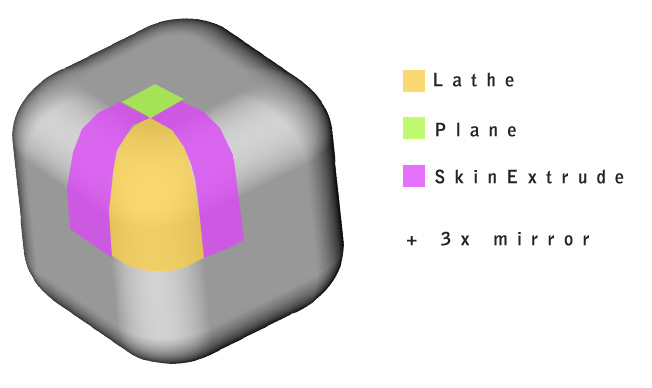
> >>>> 1 Lathe for the whole corner
> >>>> 2x  SkinExtrudes reusing same points to define half/side, both
> >>>> right and
> >>>> left, but defining half/width/depth.
> >>>> 1 1/4 plane. // note that it's not even necessary if you provide
> >>>> one skin
> >>>> extrude two points that would cover the plane area..
>
> >>>> that's a 1/8 of the cube
>
> >>>> now use Mirror class 3x time, on x, y and then z.
>
> >>>>http://www.closier.nl/playground/roundedcube.jpg
>
> >>>> Fabrice
>
> >>>> On Nov 13, 2008, at 8:56 AM, Makc wrote:
>
> >>>>> here is how you could do it by code. warning: I've got mad drawing
> >>>>> skillz
> >>>>> :)
>
> >>>>> 2008/11/13 Rialy <[EMAIL PROTECTED]>:
>
> >>>>>> Anyone can give me a more detail explanation or give me a
> >>>>>> example?
>
> >>>>>> Thanks a lot.
>
> >>>>>> On 11月12日, 下午11时38分, "Peter
> >>>>>> Kapelyan" <[EMAIL PROTECTED]> wrote:
>
> >>>>>>> Ah that's a bummer to make...I would suggest doing it in a 3D
> >>>>>>> modeller.
> >>>>>>> Otherwise there it could possibly be done with 6 shapes using
> >>>>>>> one of
> >>>>>>> Fabrice's Extrude classes, put together. My brain isn't working
> >>>>>>> well
> >>>>>>> today, so I'm not sure if it's even possible.
>
> >>>>>>> I am sure there is a button to make that shape in most decent 3D
> >>>>>>> packages..I
> >>>>>>> have made that shape a few times myself in Lightwave.
>
> >>>>>>> The smoother you want those curves to be the more poly's you
> >>>>>>> will need.
>
> >>>>>>> -Pete
>
> >>>>>>> On Wed, Nov 12, 2008 at 10:18 AM, Rialy <[EMAIL PROTECTED]>
> >>>>>>> wrote:
>
> >>>>>>>> the new primitive is like the one of following link.
>
> >>>>>>>>http://sketchup.google.com/3dwarehouse/details?mid=d6972d5d815075b2f3
> >>>>>>>> ...
> >>>>>>>> The different is that my model is not a hole in the middle.
>
> >>>>>>>> On 11月12日, 下午8时42分, "Rob
> >>>>>>>> Bateman" <[EMAIL PROTECTED]> wrote:
>
> >>>>>>>>> Hey Rialy
>
> >>>>>>>>> you'll have to give a bit more explanation of the shape you're
> >>>>>>>>> after,
> >>>>>>>>> i'm
> >>>>>>>>> not sure i get it! Maybe a quick drawing?
>
> >>>>>>>>> Rob
>
> >>>>>>>>> On Wed, Nov 12, 2008 at 2:06 AM, Rialy
> >>>>>>>>> <[EMAIL PROTECTED]> wrote:
>
> >>>>>>>>>> Hi all
>
> >>>>>>>>>> Now there is a puzzle that has comfuse me a lot time.
> >>>>>>>>>> I want to create a new model using the away3d existed
> >>>>>>>>>> primitve.
> >>>>>>>>>> The requirement as following:
> >>>>>>>>>> 1. it looks like a cube,but on its eight vertex it has a
> >>>>>>>>>> radian.
> >>>>>>>>>> 2. how to using exist image to implement texture.
>
> >>>>>>>>>> Appreciate for any advice.
> >>>>>>>>>> Raily
>
> >>>>>>>>> --
> >>>>>>>>> Rob Bateman
> >>>>>>>>> Flash Development & Consultancy
>
> >>>>>>>>> [EMAIL PROTECTED]
>
> >>>>>>> --
> >>>>>>> ___________________
>
> >>>>>>> Actionscript 3.0 Flash 3D Graphics Engine
>
> >>>>>>> HTTP://AWAY3D.COM- 隐藏被引用文字 -
>
> >>>>>>> - 显示引用的文字 -
>
> >>>>> <round_cube.GIF>- 隐藏被引用文字 -
>
> >> - 显示引用的文字 -- 隐藏被引用文字 -
>
> - 显示引用的文字 -